Artificial intelligence has revolutionized the way we approach photo editing. With the power of AI, users can now perfect their images quickly and effectively, creating stunning, professional-quality photos without needing advanced editing skills. Among these tools, a1.art has emerged as a leading platform offering unique photo enhancement and art generation capabilities. This comprehensive guide will explore how a1.art works, its standout features, and how it compares to other popular AI photo editors.
Why a1.art Stands Out as a Premier AI Photo Editor?
When editing images using AI, a1.art stands out as a versatile and user-friendly tool. Here are some reasons why it should be your go-to platform:
1. Intuitive and Accessible Platform: a1.art is designed to be straightforward, making it suitable for beginners and experienced digital artists. Its easy-to-navigate interface allows users to create or edit images without a steep learning curve.
2. Creative Flexibility: The platform offers various options, including photo filters and art styles that can transform your images in just a few clicks. Whether you’re looking for something bold and surreal or subtle and realistic, a1.art provides the flexibility you need.
3. Completely Free: Unlike many other editing platforms, a1.art allows users to access its powerful tools without a subscription or hidden fees. While premium features may be optional, the essential editing tools are free.
4. No Downloads Necessary: a1.art is web-based, so users can edit and create from anywhere without installing software. This makes it perfect for those who need quick edits without cluttering their devices with apps.
How to Use a1.art for Free Photo Editing and Art Creation
Step 1: Visit the a1.art Website
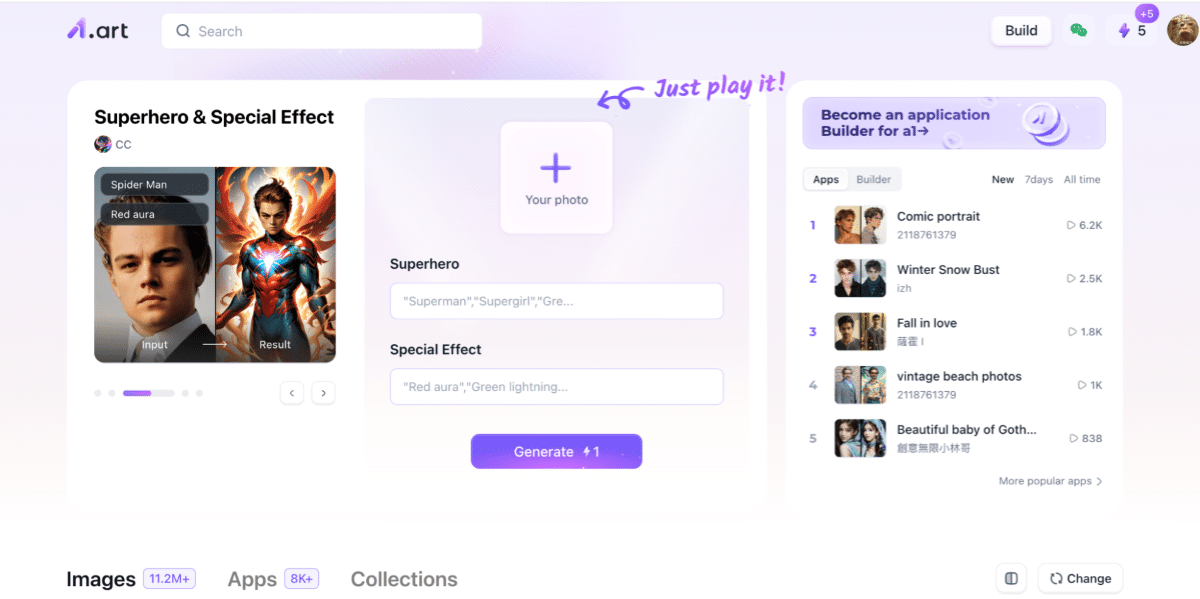
The first step to creating or editing your photos with a1.art is to visit their website. The homepage provides easy access to all the tools and features you need. While you don’t need an account to start creating, signing up offers extra benefits like saving your projects and unlocking more customization options.
Step 2: Upload an Image or Begin with a Text Prompt
Once on the site, you can either upload an existing photo for editing or start from scratch with a text prompt. This is where the true power of a1.art’s AI image generator shines. Simply type in a detailed description of what you want the final artwork to look like, and the AI will produce an image that matches your vision.
For example, if you upload a landscape photo, you can choose from a variety of artistic styles to enhance it—transforming it into a vivid, dreamlike scene or a classic oil painting look. The platform is known for its versatility, enabling users to effortlessly go from realistic renditions to imaginative art.
Step 3: Customize with AI Image Generation
After providing your input, the next step is to choose how the AI should interpret and process the data. a1.art’s AI quickly analyzes the photo or text prompt and then generates an image based on your specifications. During this step, users can modify key parameters such as color schemes, textures, and depth. This level of customization ensures you have creative control over the final output, whether it’s a detailed portrait or a whimsical, abstract design.
Step 4: Enhance Your Creation with Photo Filters
To add that extra touch to your artwork, a1.art offers a variety of photo filters that can modify mood, lighting, and texture. Applying filters can take an image from simple to captivating, giving it a polished, professional appearance. Filters range from classic black-and-white or sepia tones to more modern, vibrant effects. By experimenting with different filters, you can achieve unique visual results that enhance the overall impact of your image.
Step 5: Download and Share Your Finished Work
Once you’re happy with your edited image, the final step is to download it in high resolution. a1.art ensures you can save and share your creations without restrictions, making it ideal for posting on social media, using in projects, or printing for physical display. The platform is free to use, so you can create as many images as you want without worrying about costs.
Frequently Asked Questions About Using a1.art
1. How do I use a1.art to transfer artistic styles?
To transfer an artistic style to your photo using a1.art, sign up for an account on the platform and browse the available styles. Upload your image and select the desired artistic filter. Tapping one button instantly enhances your photo to reflect the chosen style.
2. Can I use a1.art and other AI photo editors for free?
A1.art and other AI photo editors featured in this guide are free. Some may offer premium features or paid plans for advanced capabilities, but the essential functions are accessible without cost.
3. Do I need to download software to use a1.art or other AI photo editors?
No, a1.art is a web-based platform, meaning you don’t need to download any software. This is also true for several other editors, though some offer downloadable apps for those who prefer offline editing.
4. Which editors are good for enhancing photography?
For photo enhancement, Imagen, Aftershoot, and Remini are popular choices. Imagen provides HDR merging and perspective correction, making it a strong contender for professional-quality edits. Aftershoot allows users to train its AI to mimic personal editing styles, while Remini is known for enhancing older or low-resolution images at fast speeds.
The Advantages of a1.art Over Other AI Photo Editors
While there are many great AI photo editors on the market, a1.art has distinct advantages:
Artistic Versatility: Unlike photo editors that focus solely on image correction, a1.art allows users to explore different artistic interpretations, making it ideal for creative projects.
Simplicity and Accessibility: The user-friendly design ensures that even those without experience can quickly use the platform to create beautiful images.
Customization and Control: a1.art’s customization tools allow users to adjust colors, textures, and depth, giving them control over their projects.
Case Study: Using a1.art for Face Swap
Face swapping is one of the standout features that makes a1.art a versatile and fun tool for photo editing. Whether you want to create humorous images, develop creative art pieces, or generate visuals for marketing purposes, the face swap feature provides a seamless way to achieve impressive results. This will guide you through performing a face swap using a1.art and explain why it’s a practical tool for casual and professional projects.
Performing a Face Swap with a1.art
A standout feature of a1.art is the ability to perform face swaps. This can be used for fun edits, marketing visuals, or creative art pieces. Here’s how to perform a face swap on a1.art:
1. Upload Your Base Image: Start by uploading the image you want to edit.
2. Select or Add the New Face: Choose a face from your library or upload a new one.
3. Align and Adjust: Use the platform’s tools to align and blend the face seamlessly with the original image.
4. Apply Changes and Preview: Make final adjustments and preview the result.
5. Download: Save your new image in high resolution.
Pro Tips for Using a1.art Effectively
Be Detailed with Prompts: Provide detailed descriptions for better results when creating art from scratch. For instance, “a cityscape at night under a starry sky” will yield more specific outcomes than simply “a city.”
Combine Filters: Don’t be afraid to apply multiple filters to create layered effects. This can make your image stand out and appear more professionally edited.
Try Different Styles: Experiment with artistic styles and textures to see which suits your image.
Save Your Work: If unsure about which edit looks better, save multiple versions to compare them later.
Use High-Resolution Images: Uploading high-resolution images ensures that the final output maintains its quality.
Conclusion
AI-powered tools like a1.art make photo editing and art creation more accessible. With its wide range of features, including photo filters and style transfers, a1.art is perfect for users seeking to enhance photos or explore creative projects. Its intuitive design and free access make it a standout option among AI image generator tools. Whether refining a photograph or experimenting with digital art, a1.art offers the tools and inspiration to bring your vision to life.
Published by: Martin De Juan